About Reborn Wings
Built for war. Restored for joy.
About
I chose this topic because I am drawn to the engineering of Second World War aircraft and to the way they have outlived their original purpose: the P-51, Bf 109 and Yak-3 fly side by side at airshows today, restored and admired as machines. Reborn Wings is an interactive 3D showroom built around that idea for the Interactive 3D App module at the University of Sussex (2025/26).
3D Models
I created three different aircraft models in Blender to represent three of the most famous fighters of the Second World War — the American P-51 Mustang, the German Bf 109, and the Soviet Yak-3. Each model contains two animations: a control-surface animation where the flaps or tail surfaces flex, and a propeller animation where the spinner rotates. I also separated the propeller, flaps, ailerons, and tail surfaces from the fuselage so they can be controlled and animated independently in the web page.
Process and tools
Each aircraft was modelled, rigged, and animated entirely in Blender 4. The screenshots
below show the same P-51 file (plane/plane1.blend) — first in solid shading
with the historical livery applied, and second in wireframe with the scene outliner and
animation timeline open, so the mesh decomposition (separate Fuselage,
flap.L/R, tail.L/R) and the two named animation clips
(flap and spiral) are both visible.
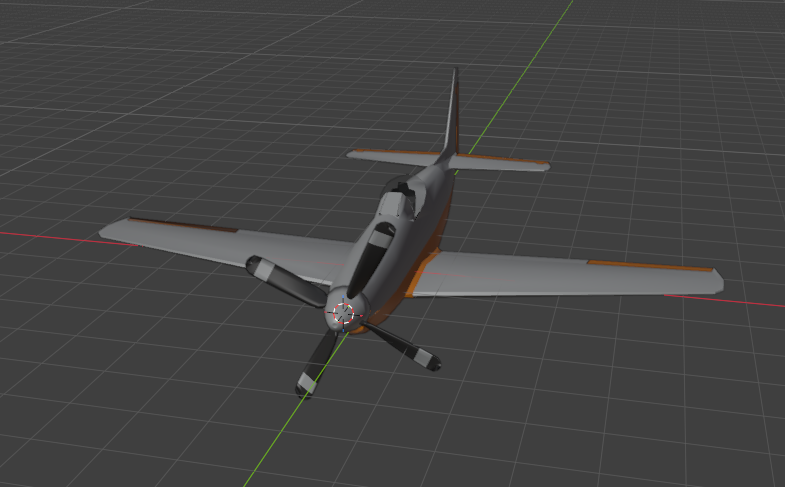
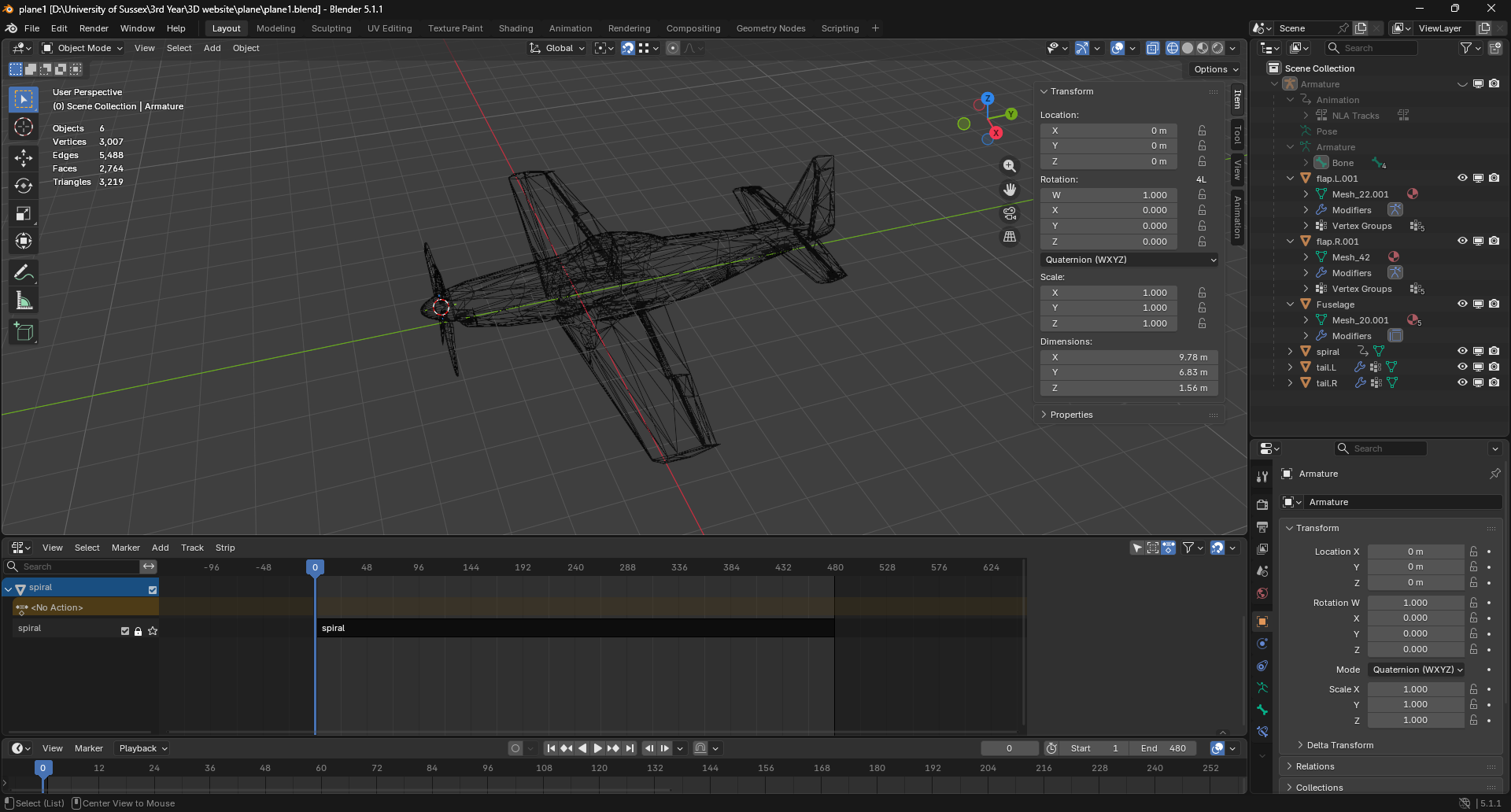
spiral animation clip visible on the timeline (the flap clip lives on the same Armature).Design
I used CSS to create a dark, warm hangar-style layout with a custom CSS logo, a sticky navigation bar, and a full-bleed 3D viewport. I used Three.js to set up the scene, with OrbitControls so users can drag to rotate and scroll to zoom around the aircraft. I also added a procedural sunset Sky behind the planes, an HDRI environment for reflections, and four named lights (ambient, key, spot, rim) with on-screen buttons to control wireframe mode, shader mode, bloom, camera presets, and light visibility.
Integration
For audio I used a propeller-engine recording from Pixabay (Pixabay Content Licence),
played by an HTML5 <audio> element from the Sound tab in the info card. I built a
small hangar floor in front-end code using a procedurally painted canvas texture with a
warm light pool baked in to match the sunset overhead. In the rendering code, I generated
each aircraft's historical paint scheme (silver P-51, RLM-camouflage Bf 109, VVS Yak-3)
at runtime by mapping a small colour palette onto the model's largest meshes, with
specific parts (tail, ailerons, propeller spinner) overridden by name. I also wrote a
custom GLSL shader that can replace the PBR materials with a Fresnel-rim preview for
inspecting model geometry.
Interaction
Users can switch between the three aircraft using the top strip (with a hangar-door transition), and read each plane's story in the side info card with Story / Image / Sound tabs. In the 3D viewer, they can drag to orbit and scroll to zoom, toggle wireframe mode, switch to the custom shader, and turn the bloom post-processing on or off. They can also play the two animations for each plane, jump between four camera presets (front, side, top, iso), toggle each light independently, adjust the key-light intensity, and trigger the engine sound from the Sound tab.
Implementation
Built with HTML5, CSS3, JavaScript ES modules, Three.js r160, Bootstrap 5.3, and
jQuery 3.7. The code follows a lightweight MVC pattern: the Model is
the PLANES[] array in js/main.js (structured so it could be
swapped for a JSON or PHP/SQLite endpoint later); the View is the
Three.js scene plus index.html and css/style.css; the
Controller is js/ui.js, which routes DOM input to the
view's public API on window.RebornWings.
Tested on Chrome 124, Firefox 125, Edge 124 (Windows 11) and Safari 17 (iPad). Three
issues caught during testing and fixed: the original 5.7 MB plane1.glb was
stalling first load (compressed to WebP, now <500 ms); wireframe state was lost on
plane switch (now cached and re-applied on plane:loaded); spotlight target
was never added to the scene (now correctly aimed).
Deeper Understanding
Five concrete features reach past the basic "rotating object" lab demo:
- Custom GLSL shader — Fresnel rim + time-driven scan-line, toggleable via the Shader button.
- Post-processing bloom —
EffectComposer+UnrealBloomPass, switchable at runtime. - In-Blender animations — two named clips per aircraft, driven by
Three.js's
AnimationMixer. - glTF optimisation —
plane1.glbcompressed 5.7 MB → 334 KB (94 % saving) via WebP at 1024² with@gltf-transform/cli. - Procedural atmospheric sky — Three.js's
Skywith the Preetham-Hosek scattering model, tuned for a layered red-gold-blue sunset behind the aircraft.
Accessibility was treated as part of going further: semantic landmarks, ARIA labels and
aria-pressed on every toggle, focus rings via :focus-visible,
prefers-reduced-motion support, and WCAG AA contrast on primary text.
Implementation and Publication
Hosted on the University ITS Web Server (URL on the
Submission page) and re-tested on the deployed URL. The
submission zip contains the full codebase, the optimised .glb models, and
the editable Blender .blend sources, as required by the assignment brief.
Generative AI Usage Record
Per the University of Sussex policy on generative AI, this is a complete record of AI use in the project. No AI-generated assets appear in the submission — every 3D model, texture, palette, audio sample, and written paragraph was produced by hand.
I use Claude in VS Code for line-level code completion in JavaScript and CSS, allowing Claude to interpret error messages. I also use ChatGPT to learn more about improving my website. All adopted suggestions have been manually reviewed and edited; no unmodified complete files have been directly inserted.
Image and Sound Sources
All 3D models, textures, and colour palettes are my own work — no third-party model files were imported. The engine sound effect is "Small Propeller Plane Flyby" by kalsstockmedia on Pixabay, used under the Pixabay Content Licence (free for commercial use, no attribution required — credited here anyway). Reference photographs used to guide modelling were consulted from Wikipedia and Wikimedia Commons (citations on the References page). The HDRI for image-based lighting is the public Royal Esplanade equirectangular HDR from the Three.js examples (MIT), loaded from the Three.js CDN at runtime.